Indoor Air Quality Control and Monitoring
Humidification
The thermostat reads the indoor humidity level and allows the user to set a humidification setting with or without window protection.
Control Humidification Level (If thermostat has been wired and setup to control a humidifier)
-
Touch MENU and select Humidification.
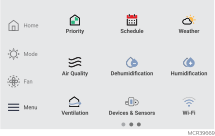
Use the slider bar to select the desired humidity level. Typically this will be a setting between 35 to 55% RH.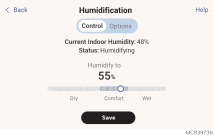
-
Touch Save to save your settings.
-
If frost or condensation appears on the windows due to too much humidity, enable Window Protection and adjust the level.
Window Protection
Window Protection limits the amount of humidity to prevent frost or condensation on windows. To use Window protection, the ElitePRO™ Series Thermostat must know outdoor temperature from
The thermostat prevents frost or condensation on windows by not allowing the humidifier to run above a certain level. To prevent frost or condensation, the thermostat may turn off the humidifier before the humidity setting is reached.
You can adjust the Window Protection setting by touching MENU, then select Humidification > Options > Window Protection Level. Window Protection is set on a scale from 1-10. A setting of 10 represents poorly insulated windows and a setting of 1 represents well insulated windows. A higher number automatically reduces the humidity to help prevent frost or condensation on your windows. Use a lower number if indoor air seems too dry. To prevent frost/condensation on your windows during cold outdoor temperatures, poorly insulated windows require a higher Window Protection setting, which will limit how much your humidifier can run. After you set the Window Protection setting, check for frost/condensation on your windows in the morning. If frost/condensation is present, adjust the Window Protection setting to the next higher number and check for frost/condensation on your windows the next morning.
Continue to adjust the Window Protection setting to a higher number until frost/condensation is no longer present. If Window Protection is turned Off, the thermostat controls the humidity level to the user's desired humidity setting. Frost or condensation may appear on windows.
Dehumidification
The thermostat reads the indoor humidity level and allows the user to set a dehumidification setting. The thermostat controls the humidity level using the cooling system or a whole house dehumidifier.
Dehumidification Using the Cooling System
When set for A/C with Low Speed Fan, A/C with High Speed Fan or Reheat. The thermostat uses the cooling system to reduce humidity by lowering the temperature as much as 3 °F below the current cool set point until the desired humidity level is reached.
If humidification and dehumidification are both set up to operate in the system mode (Off), the thermostat will automatically enforce a 15% deadband between the humidification and dehumidification settings. The thermostat will automatically switch between humidification and dehumidification to maintain the desired humidity level.
Dehumidification Fan Speed Priority
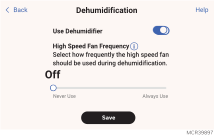
If the house has circulation issues to certain parts of the house when running in low speed, this feature will allow the thermostat to use the high speed fan more often so that the conditioned air has better circulation within the home.
-
Low Speed Fan with Cool Stage 1 Only when the thermostat is set to humidify with low speed fan, and humidity is high, and cooling is running at stage 1, always run with the low speed fan. When cooling goes to stage 2, it ramps up to high speed fan.
-
Low Speed Fan Always Regardless of which cooling stage is active, the thermostat will exclusively use the low speed fan when dehumidifying.
-
User Selectable The homeowner can set the high speed fan priority based on their comfort level (reachable via Menu > Dehumidification > Options > High speed fan) If set to 10, the thermostat will always use the high speed fan and never switch into low speed mode operation. If set to 0, the thermostat will only use the low speed fan and never switch to the high speed fan when the humidity level is above the Dehumidification setting.
Dehumidification Away Mode
If configured for dehumidification away mode by the installing pro, your system can be set to control indoor climate while your home is vacant during the humid season. Before you leave, touch MENU, then select Dehumidification Away Mode. Temperature and humidity will be kept at levels that protect your home and possessions. When you return, touch Stop to resume normal operation.
Control Dehumidification Level (If thermostat has been setup to control a dehumidifier or AC with High Speed fan)
-
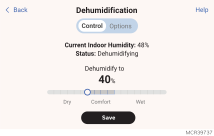
Touch MENU and select Dehumidification.
-
Use the slider to adjust the desired Dehumidification level. Typically this will be a setting below 65% RH.
-
Touch options if you want to enable/disable the dehumidifier.
-
Touch Save to save your settings.
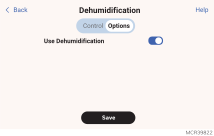
When disabled, the display will show off when viewing the dehumidifier setting screen.
If your air conditioner is used to control humidity, the temperature may drop up to 3° F below your temperature setting until humidity reaches the desired level.
If humidification and dehumidification are setup to operate in the same system mode (Off) the thermostat will automatically enforce a 15% deadband between the humidification and dehumidification settings. The thermostat will automatically switch between humidification and dehumidification to maintain the desired humidity level.
Ventilation
The thermostat can be set for the following ventilation types:
-
ERV/HRV
-
Passive (Fan Only)
-
Fresh Air Damper
-
Economizer (The Economizer settings are in a different section and used only when the ElitePRO™ Series Thermostat is set for commercial application)
Ventilation Control Methods
Ventilation can be setup to meet
ASHRAE
The thermostat operates ventilation equipment to meet the ASHRAE 62.2 ventilation standard based on CFM, number of bedrooms, and square footage of the house.
ASHRAE 62.2 can only be met if the ventilation equipment is running. If the ventilation equipment is off for any reason (outdoor ventilation lockouts, set up to turn Off during Sleep period, turned off by user, etc.), ASHRAE 62.2 is not met during those times.
Percent On Time
The thermostat operates ventilation equipment based on a percentage entered in the installer setup. For example if Percent On Time is set to 50%, the ventilation equipment will run at random times during a 1 hour period until it reaches a 50% run time (approximately 30 minutes). Default setting is 30%. Range is 10% to 100% in 10% increments.
Control Ventilation Level
-
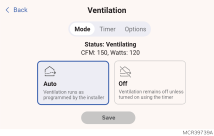
Touch MENU, and select Ventilation. You can check or change the ventilation mode.
Mode: -
Auto: Ventilation runs to follow
-
Off: Ventilation remains off unless turned on using the timer.
-
Timer: To temporarily turn the ventilator on, use the up arrow to set the number of minutes you want the ventilator to run (0-180 minutes). To cancel a temporary setting, touch “Cancel Timed Ventilation”.
-
Touch Save to save your settings.
The display will show whether the ventilator is currently running under “Equipment status”.
Indoor Air Quality Monitoring (S1100 and S1200 only)
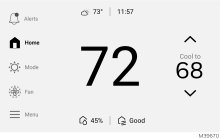
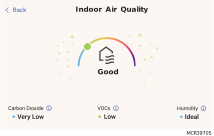
The
Some application environments may regularly generate Air Quality alerts from expected conditions such as the natural vapors from carpets and other materials in new construction homes.
|
Estimated CO₂ |
Air Quality Reading |
|---|---|
|
> 3000 |
Very Bad |
|
2000 to 2099 |
Bad |
|
1000 to 1999 |
Medium |
|
600 to 999 |
Good |
|
< 600 |
Very Good |
|
VOC |
Air Quality Reading |
|---|---|
|
> 1000 |
Very Bad |
|
300 to 999 |
Bad |
|
100 to 299 |
Medium |
|
30 to 99 |
Good |
|
< 30 |
Very Good |
Carbon Dioxide (CO₂)
Carbon dioxide is produced by breathing and from any gas (combustion) appliance such as a gas furnace, gas stove top and/or oven, etc.
Volatile Organic Compounds (VOCs)
VOCs are chemicals that can come from common household items like paint, cleaners, and furniture. While it's normal to have some VOCs present in the air, it's good to keep spaces ventilated.
Solutions for poor Indoor Air Quality:
Carbon Dioxide (CO₂):
Carbon dioxide is produced by breathing and from any gas (combustion) appliance such as a gas furnace, gas stove top and/or oven, etc. If CO₂ is high, it is most likely indicating insufficient ventilation for the number of people in the space. Running the exhaust fan while cooking or opening windows can help in some cases, however if outdoor air quality is poor due to conditions such as forest fires, outdoor barbeques, burning leaves, a window over the vent of a running dryer, etc. then opening a window may be the cause of the poor air quality indoors. If the indoor CO₂ is regularly high, Honeywell Home offers whole home ventilation solutions. In most cases proper ventilator will greatly reduce the CO₂ levels in a home. These products are sold and installed by HVAC pros. The ElitePRO™ Series Thermostat can control a whole home ventilator.
Volatile Organic Compounds (VOCs):
VOCs are chemicals that can come from common household items like paint, cleaners, and furniture. While it's normal to have some VOCs present in the air, it's good to keep spaces ventilated. Running the exhaust fan while cooking and opening a window when outdoor air quality is good will help improve air quality. Honeywell Home offers whole home ventilation solutions. In most cases proper ventilator will greatly reduce the VOC levels in a home. These products are sold and installed by HVAC pros. The ElitePRO™ Series Thermostat can control a whole home ventilator.
Humidity:
The ElitePRO™ Series Thermostat detects the humidity level at the thermostat and/or wireless indoor sensors. The ElitePRO™ Series Thermostat can control a humidifier or dehumidifier to maintain more comfortable levels of indoor humidity. These products are sold and installed by HVAC pros.
Disabling Air Quality Monitoring on Thermostat:
The installer may have disabled indoor air quality monitoring during setup.
Disable push notifications and email notifications:
The homeowner can disable push notifications and email notifications through the Resideo Connect app. In the app, select the thermostat. Select the Gear icon in lower right. Select Alert management. Scroll down to the Carbon Dioxide and VOC alert options. Adjust those settings as desired.
If the options to disable notifications are not shown, those notifications are not currently being sent.